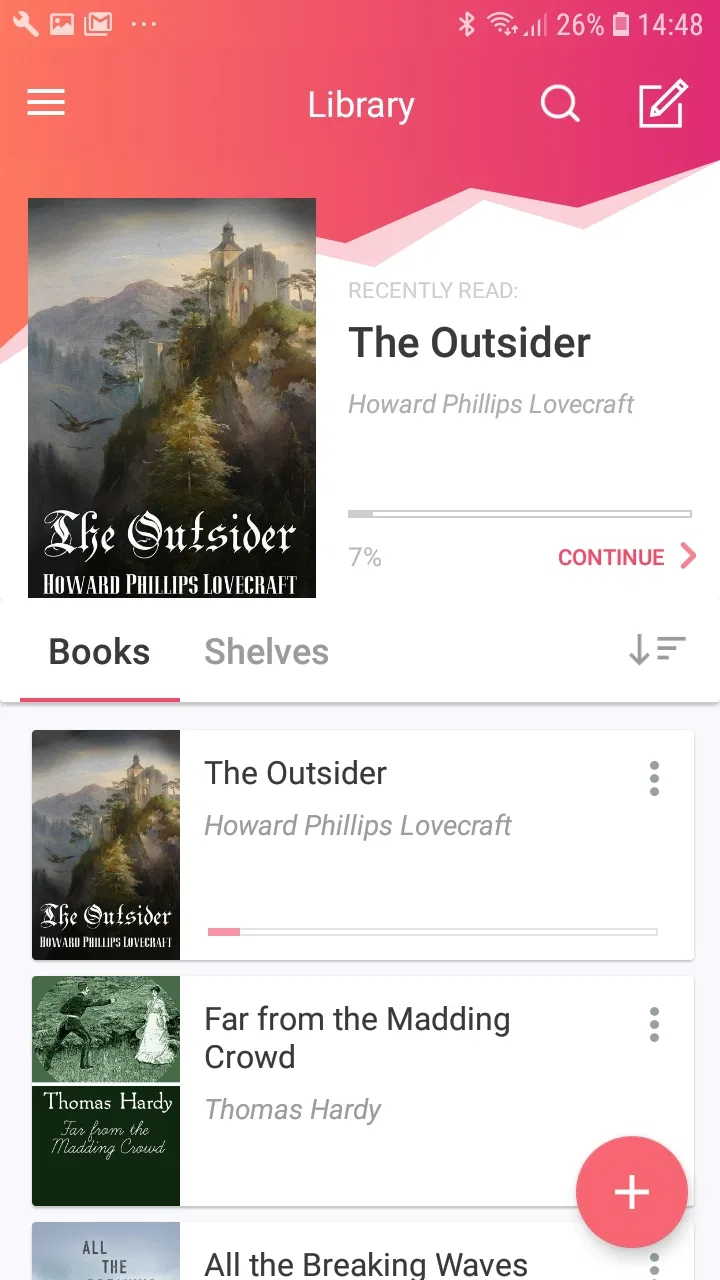
eBoox: ePub PDF e-book Reader
- 4.7
- Rating
- 10.00M
- Installs
- Free
- Price

 Analysis by App-foxy
I like eBoox: ePub PDF e-book Reader because it approaches reading as a practical household task rather than trying to turn every book into a social platform. When I installed it, the first impression was straightforward: this is an Android reading app for opening books already stored on a device, with support for several familiar formats. That makes it especially useful when one phone or tablet is shared between people who keep different kinds of reading material.
The app comes from ReadingApp and belongs in the Books & Reference category. It is free to install, carries an Everyone age rating, and works on devices running Android 5.0 or later. Its current version is 2.62.0.5, while optional in-app purchases range from $0.49 to $4.99 per item. I would not describe it as a complete digital bookstore; I see it more as a flexible reader for files you already have.
How eBoox works in a shared household
A realistic example is a family tablet used in the evening. One person may have a novel in EPUB, another may need a PDF manual, and a child may open a short TXT story or a document saved in DOC format. Instead of installing a separate viewer for every file type, eBoox gives those materials one reading destination. That is the strongest reason I would recommend trying it.
You May Also Like

 AccuWeather: Weather Radar
AccuWeather Review: A Quick, Clear Forecast for Everyday Decisions
For everyday plans, the best forecast is the one you can understand quickly. AccuWeather makes rain timing, radar, and local conditions easy to act on, with a few trade-offs.

 Hill Climb Racing
Why Hill Climb Racing Still Turns Crashes Into One More Run
A tiny car, a bumpy hill and one more upgrade: Hill Climb Racing keeps resurfacing because its simple chaos makes every near-miss feel personal.

 AliExpress - Shopping App
AliExpress Makes Global Shopping Feel Personal, but Shoppers Bear the Risk
AliExpress turns a global marketplace into a pocket-sized discovery engine. Its reach is useful, its shopping loop compelling, and its trade-offs easy to miss.

 Lords Mobile: Kingdom Wars
Lords Mobile Is a Kingdom-Building Routine, Not a Quick Match
A case-by-case verdict on the building, battles, device demands, and social commitments that make Lords Mobile rewarding for some players and exhausting for others.

 PDF Scanner app - TapScanner
TapScanner Makes Paperwork Easier to Capture, Check, and Share
TapScanner makes scanning with a phone feel less like a rescue operation and more like a dependable step in getting work done. Its capture tools are useful, though not flawless.

 Block Blast!
 Shows How Much a Puzzle Game Can Leave Out
A quiet grid game shows why puzzle players increasingly value instant clarity, repeatable skill and low-pressure play—and where the genre still needs to catch up.
More From Our News Desk
View All News


The supported formats are unusually useful for mixed personal libraries. EPUB is comfortable for ordinary books because text can adapt more naturally to the screen. PDF is better for fixed layouts, such as scanned pages, worksheets, or manuals. DOC and TXT cover simpler documents, while MOBI and FB2 are valuable for readers who have collected books from older or specialized sources. ZIP support is also practical when books arrive packaged together rather than as individually extracted files.
That range changes how I would organize a shared device. I would keep the reader installed for general access, then give each person a simple folder or file-naming habit outside the app. For example, putting initials at the beginning of filenames makes it easier to identify ownership before opening anything. This is not a special household feature; it is a small workflow that prevents confusion when several people use the same screen.
The important boundary is that a shared reader is not automatically a shared account space. I would not hand the tablet to another person without considering what reading material is visible in the library or recently opened area. A reading app can make access convenient, but convenience also means that the next user may encounter the previous user’s books or position. Families should agree on what belongs on the common device and what should remain on a personal one.
What setup feels like in daily use
My preferred setup would be deliberately simple. I would first place the files I actually want to read in a clearly named folder, then open them through eBoox rather than importing an entire, disorganized download folder. This keeps the library easier to understand and makes it less likely that a temporary document is mistaken for a finished book.
For a personal phone, that extra organization may feel unnecessary. On a shared tablet, it matters more. A child looking for a story should not have to sort through work documents, receipts, or technical PDFs. Likewise, an adult should not assume that every item in the app is suitable for every other household member simply because the application itself is rated Everyone.
The minimum Android requirement is modest, so the app is a plausible option for an older device that is no longer ideal for demanding software. That can be useful when a family repurposes an older phone as a dedicated reading screen. Still, the reading experience will depend heavily on the device’s display, storage, and speed, so I would test the actual files on the intended device before moving a whole library there.
One useful habit is to keep a backup of important books outside the reader. I would never treat the app as the only copy of a personal library. If the tablet is reset, replaced, or cleared by another user, the files should still exist somewhere safe. This is particularly important for documents shared among family members, because a reading application is convenient for opening files but is not a substitute for a household backup routine.
Coordinating reading without overcomplicating it
eBoox works best when the household agrees on a few basic rules. Decide who may add files, where those files should be stored, and whether the device is for private reading or communal material. A small amount of coordination prevents the library from becoming a jumble of unrelated downloads.
I would also separate “currently reading” from “available to everyone.” A book opened for one person may appear alongside shared material, which can lead to accidental opening or misplaced progress. Using folders with names such as “Shared,” “Adult,” “School,” or “Work” is a more dependable approach than expecting the reader itself to understand family roles.
For group reading, the app can be useful in a very ordinary way. A parent might load a PDF worksheet, a student might read an EPUB, and someone else might consult a DOC file on the same tablet at different times. The benefit is not collaboration in the modern messaging sense; it is format flexibility. Everyone can use the same basic reading tool even when the source files were created differently.
There is a trade-off here. A dedicated reading app is cleaner than opening every file in a general file manager, but a shared library still needs human organization. If your household expects automatic profiles, separate histories, or carefully isolated personal shelves, I would look for a reader explicitly built around multiple users instead. I would choose eBoox when the priority is opening many formats easily, not when the priority is managing distinct identities.
Age, trust, and the meaning of the Everyone rating
The Everyone rating makes the app itself suitable for a broad age range, but that should not be confused with a guarantee about every book opened inside it. eBoox is a container for reading material. The content comes from the files placed on the device, so parents and caregivers still need to decide what belongs in a child’s accessible folder.
This distinction is easy to miss. A family may see an age-friendly app icon and assume the whole reading environment is child-friendly. I would instead review the actual library, especially if the device receives files from several people. The safest shared setup is one where children have a clearly defined collection of books and adults keep personal documents elsewhere.
Trust also matters for privacy. If a partner, roommate, or child uses the same device, they may see titles that reveal personal interests, schoolwork, or professional material. That is not necessarily a fault in the reader; it is a consequence of sharing one device. My practical advice is to use a personal device for sensitive reading and reserve eBoox on the common tablet for material everyone is comfortable seeing.
This is also where age changes the best workflow. Younger readers benefit from a short, curated library with recognizable filenames and fewer distractions. Teenagers may prefer control over their own folders. Adults handling manuals or work documents may need a private space. The app can serve all three situations as a file reader, but the household has to create the boundaries around it.
Where it is stronger than ordinary alternatives
Compared with relying on a phone’s default document viewer, eBoox is more appealing when your library mixes EPUB, PDF, DOC, MOBI, FB2, TXT, and ZIP files. Default viewers often handle one or two formats well, while a general-purpose file manager may make reading feel like an afterthought. The advantage here is having a purpose-built place for varied reading material.
It is also a better fit than a bookstore-centered reading app if you already own files from different sources. I would choose a store app when I want purchasing, recommendations, and a tightly connected catalog. I would choose eBoox when I have accumulated books independently and want to open them without rebuilding my collection inside one vendor’s ecosystem.
PDF is the main exception to my enthusiasm. A fixed-layout document can remain awkward on a small phone, no matter which reader opens it. If the PDF is a scan, a form, or a page designed for printing, a larger screen may be much more comfortable. eBoox expands compatibility, but it cannot change the underlying design of a badly formatted document.
ZIP support is another feature I find more useful than it first sounds. It can reduce preparation when a collection arrives compressed, but I would still be careful with archives from unknown sources. Keeping files from trusted places and checking what is inside before sharing them with children is sensible. The convenience of opening a package should not replace ordinary file hygiene.
Small workflows that make the app more useful
My first tip is to use descriptive filenames before importing or opening books. Include the author or subject and, for shared devices, the intended reader. This makes coordination much easier than relying on memory, especially when several files have generic names such as “document” or “book.”
My second tip is to test one file from each format you use most. EPUB, PDF, DOC, MOBI, FB2, and TXT do not behave identically because they are built for different purposes. A short trial tells you whether your usual documents are comfortable on the device and whether the shared tablet is powerful enough for the collection you want to keep there.
My third tip is to maintain a “temporary” folder outside the main reading collection. Downloads, school handouts, and documents received for one-time use can be moved there first. After reading, delete or archive them deliberately. This keeps the app from becoming a permanent record of every file that has passed through the device.
A fourth useful habit is to agree on a handoff routine. Before giving the tablet to someone else, close the current document and return to the library. That simple action avoids revealing the previous reader’s page and makes it less likely that another person will continue from the wrong position. It also makes shared use feel more intentional.
Value, limits, and who should skip it
The app is free, which makes it easy to try without committing money at the start. Optional purchases are available, with individual items priced from $0.49 to $4.99. I would decide whether those extras are worthwhile only after using the basic reader with my own files, because the real value depends on how often I read locally stored books and how much control I want over the experience.
Its popularity is reassuring: eBoox has passed ten million installs, with an average rating of 4.6 from around two hundred sixty-six thousand ratings and about one thousand seven hundred reviews. Those figures suggest that many people find the central idea useful, but they do not remove the need to judge it against your own reading habits. A large user base cannot make a small phone screen comfortable for every PDF.
I would skip it if my reading is entirely tied to one bookstore, if I need strong family profiles, or if I expect a full cloud library that follows me automatically across devices. I would also hesitate if most of my material is scanned PDF and I read primarily on a compact phone. In those cases, a specialized PDF tool, a bookstore’s own app, or a reader with clearer account separation may suit me better.
On the other hand, I would recommend it to someone with a mixed collection who wants one Android app instead of a patchwork of viewers. It is particularly sensible for an older spare device, a household tablet with carefully organized folders, or a reader who receives books in formats that mainstream apps do not always prioritize.
My household verdict
After considering the shared-device angle, I see eBoox as a capable and practical reader rather than a family-management system. Its strength is broad file support: EPUB, PDF, DOC, MOBI, FB2, TXT, and ZIP give it a useful role in homes where reading material comes from many places. The free entry point and broad Android compatibility make experimentation easy.
The best experience comes from setting boundaries before the first person starts reading. Keep shared books separate from private documents, use clear filenames, curate children’s folders, and preserve backups outside the app. Those steps are not glamorous, but they solve the real problems that appear when one tablet serves several people.
ReadingApp has built something I would gladly keep on a shared Android device when flexibility matters more than profiles or store integration. I would not present it as the answer for every reader, especially people who need strict account separation or advanced document workflows. For a household that simply wants a dependable place to open a varied collection, though, eBoox: ePub PDF e-book Reader is an easy recommendation to test.
FAQs for eBoox: ePub PDF e-book Reader
01What file formats does eBoox support?
eBoox is designed to support a wide range of e-book formats, ensuring compatibility with your library. The app can handle popular formats such as ePub, PDF, MOBI, FB2, and others. This versatility makes it a convenient choice for users who have diverse collections of digital books.
02Is eBoox available for both Android and iOS devices?
Yes, eBoox is available for both Android and iOS platforms, providing a seamless reading experience across different devices. Users can download the app from the Google Play Store for Android devices or the App Store for iOS devices, ensuring broad accessibility for all users.
03Does eBoox offer customizable reading options?
eBoox offers a variety of customizable features to enhance your reading experience. Users can adjust the font size, style, and color, as well as the background and brightness settings. These features ensure that readers can tailor the app to their personal preferences, optimizing comfort during extended reading sessions.
04Is it possible to sync my e-books across multiple devices with eBoox?
eBoox supports synchronization across multiple devices, allowing you to maintain your reading progress wherever you go. By creating an account and enabling sync, your bookmarks, notes, and last read pages can be kept up-to-date on any device you use, provided it is connected to the internet.
05Are there any in-app purchases or ads in eBoox?
eBoox is designed to provide a clean, ad-free reading experience, ensuring uninterrupted focus on your books. While the app is free to download, it may offer additional features or content through in-app purchases. These purchases are optional and are meant to enhance user experience without compromising the app's core functionality.
Pros
- User-friendly interface enhances reading experience.
- Supports multiple formats like ePub and PDF.
- Customizable settings for text size and color.
- Offline reading available for convenience.
- No ads for uninterrupted reading sessions.
Cons
- Limited compatibility with certain e-book formats.
- Occasional crashes on older devices.
- Lacks advanced note-taking features.
- Syncing issues with cloud services.
- No built-in dictionary for quick lookups.

eBoox: ePub PDF e-book Reader
Gallery